Skip to content

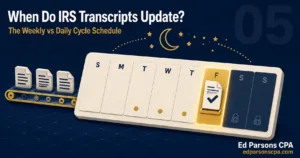
The IRS cycle code is an 8 digit number on your account transcript. The first four digits are the processing year, the next two are the processing week, and the last two are the day your account updates. A code ending in 05 means weekly updates. Codes ending in 01 through 04 mean daily updates.
Most taxpayers stare at their transcript looking for code 846 and skip right past the one number that tells them when to look: the cycle code. Once you can read it, you know which day of the week your account can update, and you stop refreshing on days when nothing can possibly change.
It is also the number that explains why two coworkers who filed the same day get refunds weeks apart, and why refund forums are full of people comparing dates that were never comparable in the first place.
The processing date sits right beside it and causes just as much confusion. It is not your refund date, but it is one of the best clues to where your return sits in the pipeline. This guide decodes both.
How to Read the 8 Digits of Your Cycle Code?
The cycle code appears in the transactions section of your account transcript, next to code 150. It breaks into three parts.
| Digits | What They Encode | How to Read Them |
| First 4 | Processing year | The year the IRS is processing your return in, which is not always the tax year of the return itself. |
| Middle 2 | Processing week | The week of the IRS processing calendar your return posted in. The count starts at the beginning of the processing year. |
| Last 2 | Processing day | The day within the cycle your account posts. This pair of digits determines whether you are a daily or weekly account. |
So a cycle code ending in 0605 reads as processing week six, day five. The week tells you where you entered the queue. The day tells you when your transcript can change.
Two filers who submit on the same afternoon can land in different weeks. E-filed returns post to the master file in batches, and the batch you join depends on volume, your return type, and whether anything on the return needs a second look before posting. The cycle code records where you actually landed, not when you clicked submit.
That is why the cycle code beats the filing date as a timing tool. Your filing date starts the clock in your head. The cycle code shows where the IRS actually started it.
Daily vs Weekly Accounts: The Last Two Digits Decide Everything
The final two digits split all taxpayers into two camps, and each camp has a different update rhythm.
| Factor | Daily Accounts (01 to 04) | Weekly Accounts (05) |
| Update rhythm | Transcript can update any processing day, typically midweek through the end of the week. | Transcript updates once per week, overnight into the end of the week. |
| Where’s My Refund | Status tool can refresh any day. | Status tool typically refreshes the day after the transcript does. |
| Who lands here | Most straightforward returns with no account conditions. | Returns with credits under review, amended history, or prior account activity. |
| Checking strategy | A quick daily check is reasonable. | Checking more than once a week is wasted effort. |
| Measurement | Watch for new codes posting on any weekday cycle. | Watch the transcript at the end of each week. One update window, once a week. |
What the Processing Date Actually Means
The processing date appears near the top of the transactions section, and it is the most misread date on the entire transcript. It is not your refund date. It is a projected milestone the IRS master file assigns to your account, and it moves forward if your return needs more time.
Think of it as the date the IRS expects your account to be settled, calculated from your cycle position. Three things follow from that.
- If your return is clean, the refund often releases before the processing date arrives.
- If a hold code like 570 posts, the processing date typically pushes forward by one or more weeks.
- The date next to code 846, when it posts, is the only date that is actually your refund date.
The processing date also resets in predictable increments. When a return needs another cycle, the date typically rolls forward a week at a time. Watching how far and how often it moves tells you whether your return is in a routine queue or stuck behind a review. A date that rolls once is traffic. A date that keeps rolling with a 570 beneath it is a review.
If you have not pulled your transcript yet, our guide to understanding IRS account transcripts and how to read them walks through where every field sits. Transcripts are free through the IRS Get Transcript tool.
Using the Cycle Code to Predict Your Refund Window
The cycle code does not promise a refund date, but it narrows the window. The method is simple.
- Find your cycle code next to code 150 and note the last two digits.
- Identify your update day from those digits. That is the only day new codes can post for you.
- Once code 846 posts, the date beside it is your scheduled refund. Direct deposits usually land on or within a few days of that date.
- No 846 by your update day means you wait one more cycle. Nothing will change in between.
The window logic also works in reverse. If a hold code posts, your cycle code tells you the earliest day a release could appear. A weekly account with a 570 cannot show a 571 until the next weekly update, so there is no reason to check sooner and no reason to panic in between.
For what the surrounding credit codes mean while you wait, see our breakdown of transcript codes 150, 806, 766, and 768.

Common Mistakes When Reading Cycle Codes and Processing Dates
- Treating the processing date as the refund date. Only the code 846 date is the refund date.
- Refreshing a weekly account every day. A code ending in 05 updates once per week. Daily checks change nothing.
- Comparing your cycle code to someone else’s online. Two filers in the same week can sit in different cycles with different account conditions.
- Assuming the cycle code is fixed. Amended returns, holds, and resequencing can shift your account to a different cycle mid-season.
- Reading the cycle week as a countdown. The week digits are a queue position, not a number of weeks remaining.
The Questions Taxpayers Actually Ask
- “My cycle code ends in 05. When should I check my transcript?” Once a week, at the end of the week. That is your only update window.
- “My processing date passed and nothing happened.” The date rolled forward, which usually means a review or hold extended your timeline. Check for a 570 or 810 code.
- “My cycle code changed from last year. Is that bad?” No. Cycle assignment can shift year to year based on your account activity.
- “Where’s My Refund says nothing but my transcript has codes.” Normal. The transcript is the source record and updates first.
- “My transcript still says no return filed.” Your return has not posted to the master file yet. Until code 150 posts, there is no cycle code to read and no update day to watch.
When the Cycle Code Stops Being Enough
Reading your own cycle code works when the account is healthy. The moment a hold or freeze posts, the cycle code only tells you when to look, not what you are looking at or what would move it.
That distinction matters most during a delay. A frozen refund on a weekly cycle gives you exactly one meaningful data point per week, and misreading it costs you a full week before the next one. Most taxpayers in that position either check obsessively on days nothing can post or miss the one update that needed a response.
That is where the Personal IRS Transcript Monitoring Service takes over. ED parsons CPA watches your account on its actual update cycle, reads every new code in context, and flags the moment something posts that needs a response. You get the meaning behind the movement, not just the movement.
The Where’s My Refund tool will catch up eventually, but your transcript, read on the right day, is always ahead of it.