Skip to content

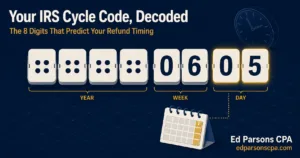
IRS transcripts update overnight on a fixed cycle, not in real time. Weekly accounts update once per week, overnight into Friday. Daily accounts can update overnight Tuesday through Friday. The last two digits of your cycle code tell you which schedule you are on. Nothing posts outside your window.
Refreshing your transcript five times a day feels productive. It is not. The IRS master file processes account updates in overnight batches on a fixed calendar, and your account belongs to exactly one lane of that calendar.
Once you know your lane, checking becomes a one-minute task on the right morning instead of a daily ritual of disappointment. Here is the actual schedule.
The Two Update Schedules
Every taxpayer account is designated either daily or weekly on the IRS master file. The designation is visible in the last two digits of the cycle code on your account transcript, printed next to code 150.
| Factor | Daily Accounts (cycle 01 to 04) | Weekly Accounts (cycle 05) |
| Transcript updates | Overnight, any processing night Tuesday through Friday. | Once per week, overnight into Friday morning. |
| Refund status tool | Can refresh any day, usually the day after the transcript. | Typically refreshes Saturday, the day after the transcript. |
| Update time | Overnight batch, generally early morning hours Eastern. | Overnight batch, generally early morning hours Eastern. |
| Weekend activity | No transcript posting. Batches do not run weekend nights. | No transcript posting. The status tool may refresh Saturday. |
| Measurement | Check once each morning, midweek onward. New codes post overnight or not at all. | Check Friday morning only. One window per week. Nothing changes in between. |
The overnight rule is the part most people miss. Transcripts do not change during business hours. If nothing posted by the time you check in the morning, nothing will post that day.
The reason is mechanical. The master file runs posting cycles as batch jobs after the processing day closes. Your account is either in that night’s batch or it is not, and no amount of refreshing changes which batch you are in.
This is also why the update lands at slightly different hours from week to week. Batch size varies with filing volume, and heavy weeks finish later in the early morning than quiet ones.
How to Find Your Own Update Day
Three steps, one minute.
- Open your account transcript for the current year and find the cycle code next to code 150.
- Read the last two digits. A 05 puts you on the weekly schedule. Anything from 01 to 04 puts you on the daily schedule.
- Set your check for the morning after your posting night, and skip every other day without guilt.
If code 150 has not posted yet, there is no cycle code to read, which is its own answer: your return has not reached the master file and no schedule applies to it yet.
Which Transcript Updates When
The update schedule above covers the account transcript, which is the one that carries your transaction codes and refund status. The other transcript types run on their own timelines.
- Account transcript: follows your daily or weekly cycle. This is the one to watch for refund movement.
- Return transcript: appears after your return fully posts, then rarely changes.
- Wage and income transcript: fills in as employers and payers file their forms, mostly through the first half of the year, on no fixed weekly rhythm.
- Record of account: a combined view that updates when its underlying pieces do.
If you are not sure which transcript you are even looking at, our guide to understanding IRS account transcripts and how to read them sorts out all four types. Every one of them is free through the IRS Get Transcript tool.
Why Your Transcript Still Says No Return Filed
The most common panic in refund season is a transcript that shows nothing weeks after e-filing. An accepted e-file means your return passed the gate, not that it posted to the master file. Until it posts and code 150 appears, the account transcript has nothing to show.
- Acceptance is a filter check, measured in minutes. Posting is a processing event, measured in days or weeks.
- Returns claiming refundable credits often sit longer in pre-posting review before code 150 appears.
- Paper returns can take many weeks to post at all, and nothing updates until they do.
- An amended return runs on its own track entirely and will not show movement on the schedule your original return followed.
This waiting period is exactly where a monitored account pays for itself. The Personal IRS Transcript Monitoring Service watches for the moment your return posts and reads what arrives with it, so a silent transcript never has to mean an unwatched one.
The Transcript Always Beats the Refund Tracker
The public refund tracker runs a day or more behind the transcript on both schedules. By the time the tool shows an approved refund, the transcript showed code 846 and the deposit date the day before.
The gap matters more when something goes wrong. The tracker collapses every problem into the same generic still-processing message, while the transcript shows the specific hold code, the date it posted, and any notice code that came with it. One tells you to wait. The other tells you what you are waiting on.
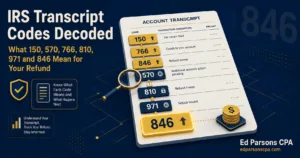
Keep the Where’s My Refund tool for a quick glance, but treat the transcript as the source record. For what the individual codes mean once they start posting, our breakdown of transcript codes 150, 806, 766, and 768 covers the sequence a healthy refund follows.

Common Mistakes With Transcript Update Timing
- Checking a weekly account daily. Cycle 05 accounts have one window per week. Six of those seven checks can never show anything new.
- Checking in the afternoon. Updates post overnight. The morning view is the day’s final answer.
- Expecting weekend movement. Posting batches do not run weekend nights. A Saturday refresh only ever catches the status tool, not the transcript.
- Reading an unchanged transcript as a problem. On a weekly account, several quiet weeks can still be normal processing.
- Comparing update days with other filers. Their cycle digits are not yours. Two filers from the same day can sit in different lanes.
When the Schedule Stops Answering the Question
Knowing your update day answers when. It cannot answer why a transcript that should be moving is not, or what a new hold code wants from you when it finally posts.
That is the trade every self-checker eventually runs into. The schedule is learnable in an afternoon. Reading what posts inside the window, and knowing which posts need a response, is the part built on experience with thousands of accounts.

At Ed Parsons CPA, IRS transcript work is the core of the resolution practice, and the transcript monitoring service turns your update schedule into a watched schedule. Your account is checked on its actual cycle, every new code is read in context, and you hear about movement that matters without spending another season refreshing on the wrong mornings.